Meta Quest 3: Is Mixed Reality Actually Useful Yet?
Mixed reality has been promised as the next major computing platform for years, with plenty of expensive headsets that never found a mainstream audience along the way. The Meta Quest 3 is the device that comes closest to actually delivering on that promise at a price a regular consumer might pay, but "closest" and "there" are different things, and it's worth being honest about which parts of the pitch actually hold up in daily use.
What mixed reality actually means on this device
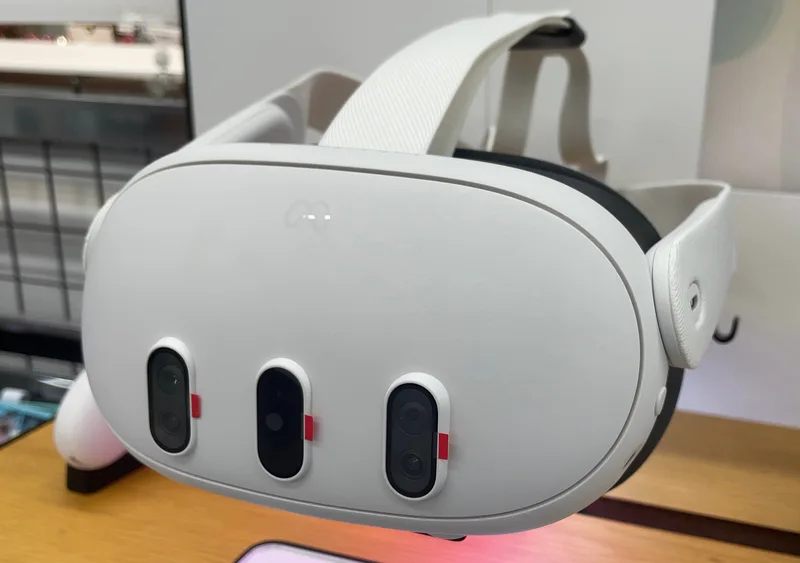
Unlike earlier VR headsets that fully blocked out the real world, the Quest 3's pass-through cameras let you see your actual room in color while wearing the headset, with virtual objects and interfaces overlaid on top of that real-world view. In practice, this means you can place a virtual monitor above your real desk, have a game creature appear to walk across your actual living room floor, or keep an eye on a real doorway while fully immersed in an app — the headset blends the two instead of forcing an all-or-nothing choice between reality and virtuality.
The pass-through quality itself is genuinely improved over the previous Quest generation, though it's still noticeably lower resolution and slightly more color-muted than your unaided eyesight, especially in dim rooms. It's good enough that most people stop noticing the compromise within a few minutes, but it's not indistinguishable from just taking the headset off, and Meta's marketing sometimes implies a seamlessness that the actual hardware doesn't quite achieve yet.
Where mixed reality is genuinely useful right now
Productivity use cases have improved noticeably since earlier Quest generations. Using the headset to create a multi-monitor virtual workspace on top of your real desk is a legitimate use case today, particularly for anyone in a small space without room for multiple physical monitors. Certain fitness and movement apps also benefit meaningfully from mixed reality, letting you see real obstacles and furniture while doing full-body workouts that would be genuinely risky in a fully blacked-out VR environment.
Gaming is where mixed reality's novelty is most immediately apparent, with a growing number of titles specifically designed around blending virtual elements into your real room rather than replacing it entirely. These tend to be the Quest 3's most impressive demos, even if the overall game library built specifically for mixed reality (rather than full VR) is still relatively small.
Where it's still clearly a first-generation feature
Battery life remains the most significant practical limitation across almost every use case, with typical sessions lasting a couple of hours before needing a recharge — fine for a gaming session, limiting for anyone hoping to use it as an all-day productivity replacement for physical monitors. The headset's weight, while improved over previous Meta hardware, is still noticeable during longer sessions in a way that a laptop or phone simply isn't, meaning genuine all-day usage isn't realistic yet regardless of software quality.
The controller-free hand-tracking, while a genuine technical achievement, is still less reliable than physical controllers for precise interactions, occasionally losing track of your hands in certain lighting conditions or when your hands overlap. Meta has improved this significantly over generations, but it's not yet at the point where you'd choose it over controllers for anything requiring real precision.
Software library and app quality
The Quest 3's software library has grown substantially and includes some genuinely excellent full VR games and experiences, but the specifically mixed-reality-focused app library — apps built to actually use the pass-through blending feature as a core mechanic rather than an optional add-on — remains a smaller subset. Many of the headset's best experiences are still traditional fully-immersive VR rather than the room-blending mixed reality that's central to Meta's current marketing pitch, which is worth knowing if mixed reality specifically, rather than VR generally, is why you're considering buying one.
Comfort, setup, and getting started
Setup is straightforward compared to older VR headsets that required external sensors mounted around a room — the Quest 3 handles all its tracking with onboard cameras, so you can be up and running within minutes of unboxing it in a completely new space, including automatic room-boundary detection that maps your real furniture to prevent you from walking into a wall while immersed. Facial comfort has improved with a redesigned strap and face cushion, though anyone who wears glasses will want to budget for the optional prescription lens inserts, since wearing regular glasses under the headset is uncomfortable during longer sessions and can scratch the lenses over time.
Audio comes from built-in open-ear speakers near your temples rather than enclosed headphones, which is a deliberate design choice that lets you still hear your real surroundings — useful for safety and for staying aware of people or pets nearby, at the cost of less immersive audio than a dedicated headphone would provide and some sound leakage that people nearby can sometimes hear.
Price and value against the alternative
The Quest 3 sits at a price point meaningfully below premium mixed-reality competitors while offering a genuinely comparable pass-through experience for most everyday use cases, which is the core of its value argument: you're not getting the absolute best mixed-reality hardware available, but you're getting a very capable version of it without paying a significant premium for marginal improvements most people wouldn't notice in daily use. Compared to a dedicated VR-only headset at a lower price, you are paying extra specifically for the mixed-reality pass-through capability — worth it if you'll actually use that feature, unnecessary if you know you only want traditional VR gaming.
Is it actually worth buying right now
If you're primarily interested in VR gaming and see mixed reality as a nice occasional feature rather than the main draw, the Quest 3 is a genuinely strong standalone VR headset independent of the mixed-reality conversation entirely. If mixed reality specifically — the promise of blending useful virtual tools into your real environment for work or daily tasks — is why you're buying it, temper expectations: the technology works, and works better than any previous consumer headset, but it's still closer to an impressive tech demo than a mature replacement for your existing monitor or workspace setup.