Framework Laptop vs Dell XPS 13: Repairability vs Refinement
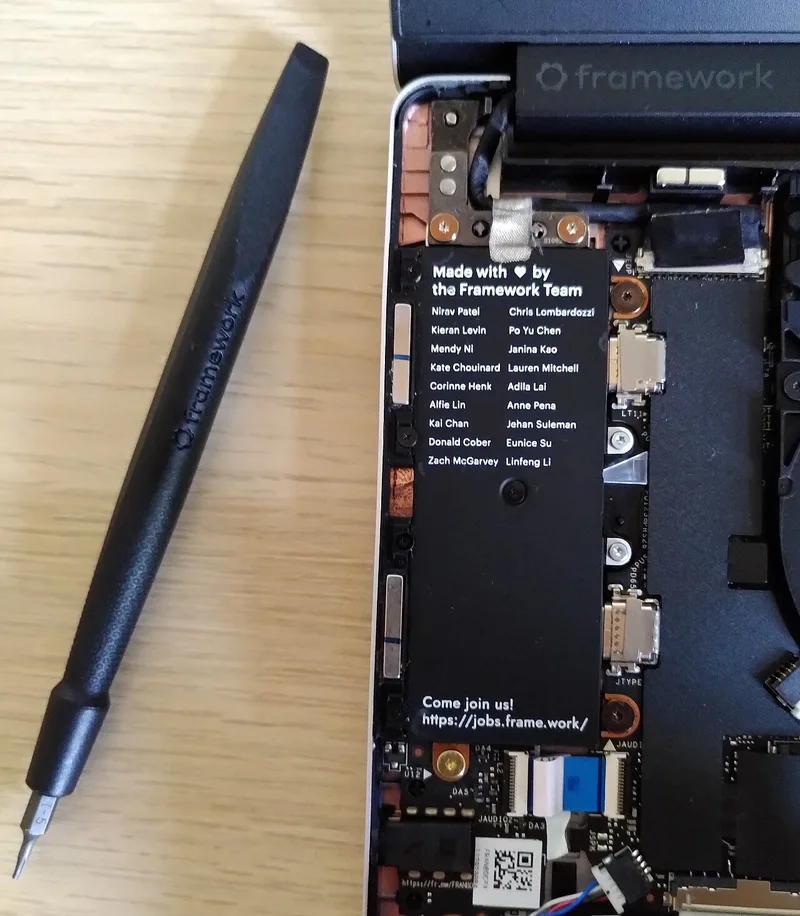
The Framework Laptop and the Dell XPS 13 represent two genuinely opposite answers to the same question: what should a premium 13-14 inch laptop optimize for? Dell's answer is thinness, fit-and-finish, and a design language borrowed from Apple's playbook of sealed, unibody construction. Framework's answer is the exact inverse — a laptop you can open with a single screwdriver, whose screen, keyboard, ports, and even mainboard are designed to be swapped rather than replaced wholesale when something breaks or falls behind.
The core trade-off
Every design decision on both laptops traces back to this fork in philosophy. The XPS 13 achieves its remarkably thin chassis and edge-to-edge "InfinityEdge" display partly by gluing and sealing components that would otherwise need service access — the battery, the SSD housing, and in some configurations even the RAM are not meant to be opened by the owner. The Framework Laptop is built around the opposite constraint: every major component sits behind a small number of Torx screws, connected with standard connectors rather than proprietary adhesive-mounted parts, specifically so a broken hinge, a dead battery, or an outdated port doesn't mean replacing the whole machine.
Where the XPS 13 wins
Dell's decade of refining this exact form factor shows. The XPS 13's keyboard deck, trackpad, and overall build quality are still a reference point other Windows OEMs get measured against — the haptic trackpad (on higher configurations) and the zero-lattice keyboard feel more considered than Framework's more utilitarian keys, which have to accommodate the modular expansion-card port system underneath them. The XPS 13's display, particularly the OLED option, delivers deeper blacks and better HDR contrast than Framework's panel choices have historically matched. And because nothing on the XPS is designed to be opened, Dell can pack components more tightly, which is a real part of why it's noticeably thinner and lighter than the Framework Laptop at a comparable screen size.
Where the Framework Laptop wins
The repairability isn't a gimmick — it changes the actual economics of owning the laptop for years rather than one generation. Framework sells its mainboards separately, meaning an owner can upgrade from an older Intel or AMD chip to a current-generation one by swapping the mainboard alone, keeping the same screen, keyboard, chassis, and battery. The port situation is arguably the more immediately useful feature: Framework's expansion-card system lets you snap in exactly the ports you personally need — USB-C, USB-A, HDMI, DisplayPort, even additional storage — and swap them out as your needs change, rather than being locked into whatever port mix Dell decided most buyers wanted the year the XPS 13 shipped. When something does break, Framework publishes repair guides and sells individual replacement parts directly, closer to how a desktop PC works than how a typical ultraportable does.
Performance and thermals
Because the XPS 13's chassis is thinner and more tightly sealed, it has less room for cooling, and under sustained heavy load — video export, large compiles, anything CPU-intensive for more than a few minutes — it tends to throttle sooner than a chassis with more thermal headroom. The Framework Laptop's slightly thicker, more service-friendly design leaves more room for its cooling solution, which in practice means it can sustain higher clock speeds for longer during demanding workloads, even though its base weight and thickness numbers look less impressive on a spec sheet next to the XPS.
Long-term value and e-waste
This is where the philosophical difference becomes a genuinely practical financial one. A five-year-old XPS 13 with a swollen battery or a broken screen is, for most owners, functionally e-waste — battery replacement requires a full teardown that voids warranty protections and isn't something Dell markets as a normal service option, and screen replacement costs often approach the value of a used replacement laptop. A five-year-old Framework Laptop with the same problems is a battery swap or a screen swap, both sold directly by Framework with published repair time under thirty minutes. If you tend to keep laptops for four-plus years and want the option to fix rather than replace, that difference compounds into real savings and less landfill.
What upgrading actually looks like
On the Framework Laptop, a mainboard swap is designed to take under an hour with basic tools, and Framework sells a case kit that turns your old mainboard into a standalone mini-PC rather than e-waste once you've upgraded — a detail that genuinely doesn't exist anywhere else in the premium laptop category. RAM and storage are both standard, swappable SO-DIMM and M.2 components rather than soldered-down chips, meaning a Framework Laptop bought with 16GB of RAM today can be bumped to 32GB or 64GB later without replacing anything else. The XPS 13, by contrast, increasingly ships with RAM soldered directly to the motherboard on its thinnest configurations specifically to save the internal space that modular RAM sockets would require — a decision that makes the initial RAM configuration you choose at checkout effectively permanent.
Screen and keyboard module swaps
Framework's modularity extends past the mainboard. The display itself is a swappable module, meaning a cracked screen is a customer-replaceable part rather than a warranty claim requiring the whole unit be shipped out, and Framework has released higher-refresh-rate and higher-resolution screen options that existing owners can retrofit into an older chassis. The keyboard, similarly, is a snap-in module, which means color options, language layouts, and eventually improved key-feel revisions can all be added to a laptop you already own, rather than requiring a new purchase. Dell's XPS 13 offers none of this — the display and keyboard are matched to whatever configuration you ordered at purchase and stay that way for the life of the machine.
Price and what you're actually paying for
At a comparable spec tier, the two laptops land in a similar price bracket at initial purchase, which makes the real cost difference show up over time rather than at checkout. The XPS 13's resale value benefits from stronger brand recognition and Dell's broader retail presence, so it's typically easier to resell quickly. The Framework Laptop's total cost of ownership tends to look better across a longer window specifically because a mainboard or battery upgrade costs meaningfully less than buying an entirely new laptop, and because Framework's parts marketplace keeps even several-year-old models serviceable rather than orphaned the way most OEM laptops become once a model is discontinued.
Who should actually buy which
If your priority is the thinnest, most polished laptop in the room, a display that looks best for photo and video editing, and you're comfortable replacing rather than repairing when something eventually breaks, the Dell XPS 13 remains one of the best-executed traditional ultraportables available. If you want a laptop you can genuinely keep for the better part of a decade, upgrading the internals as they age rather than the whole machine, and you don't mind a slightly thicker, less overtly premium-feeling chassis in exchange for that flexibility, the Framework Laptop is solving a real problem the rest of the premium laptop market has mostly ignored.