2-in-1 Laptops: When a Touchscreen and Pen Actually Earn Their Keep
The 2-in-1 laptop category has survived more skepticism than almost any other PC form factor, dismissed for years as a solution in search of a problem — a laptop with a touchscreen that folds back or detaches, aimed at a use case most reviewers couldn't quite pin down. A full hardware generation later, the category has settled into a genuinely useful niche rather than disappearing, and the honest answer to whether one makes sense is that it depends heavily on a handful of specific habits rather than being a universal upgrade over a standard clamshell laptop.
What "2-in-1" actually covers
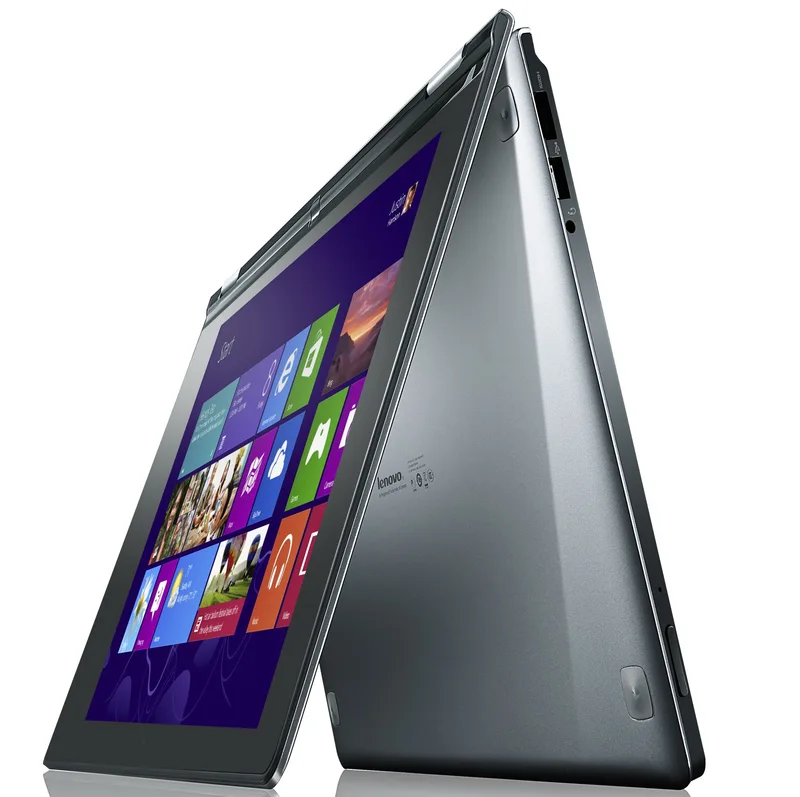
The term covers two meaningfully different designs that get lumped together in marketing. Convertible 2-in-1s use a 360-degree hinge that lets the screen fold all the way back behind the keyboard, turning the laptop into a thick tablet without physically separating any parts — Lenovo's Yoga line is the best-known example of this approach. Detachable 2-in-1s, by contrast, use a screen that physically disconnects from a keyboard base entirely, closer in spirit to a tablet with an optional keyboard accessory, with Microsoft's Surface Pro line as the reference design most competitors get compared against. The two designs solve the same basic pitch — a device that's sometimes a laptop and sometimes a tablet — through genuinely different engineering tradeoffs.
Where the convertible design earns its keep
A 360-degree hinge convertible is at its best in what's sometimes called "tent mode" or "stand mode" — folded partway to prop the screen up on a desk or tray table without needing the keyboard flat and usable, which turns out to be genuinely useful for watching video on a plane, following a recipe in a kitchen, or presenting a document to someone sitting across a table. Fully folded flat into tablet mode, a convertible functions as a somewhat thick, somewhat heavy tablet — heavier than a dedicated tablet because it's still carrying a full keyboard and battery on the back side, but capable of running full desktop-class software rather than a mobile operating system's more limited app selection.
Where the detachable design pulls ahead
Detachables solve the weight problem convertibles can't: removing the keyboard entirely leaves a genuinely tablet-weight device in hand, which matters a lot for anyone who wants to actually hold and use the screen portion for reading, sketching, or note-taking for extended periods rather than briefly propping it up. The tradeoff is that the keyboard becomes a separate accessory that has to be carried, attached, and occasionally replaced independently of the main device, and detachable keyboards generally feel slightly less sturdy on a lap than a convertible's permanently hinged keyboard, since the connection point has to support disconnecting rather than being a single fixed hinge.
The pen is the feature that actually changes workflows
For most 2-in-1 buyers, the touchscreen alone isn't the differentiator — modern Windows and macOS both support touch input adequately on standard laptops now too. What genuinely changes a workflow is active pen support, which lets a 2-in-1 function as a legitimate digital notebook or sketching surface with pressure sensitivity and palm rejection, rather than just a finger-friendly touchscreen. Students who annotate PDFs and textbooks, professionals who mark up documents or diagrams in meetings, and anyone doing digital illustration or handwritten note-taking are the clearest beneficiaries of a 2-in-1's pen support — for everyone else, the touchscreen mostly sits unused as a novelty after the first few weeks of ownership.
Performance and battery life tradeoffs
Because 2-in-1s pack a touchscreen, often a pen digitizer layer, and in the case of detachables a more complex connection mechanism into a chassis that's still expected to be thin and light, they sometimes trail comparably priced standard clamshell laptops on raw performance or battery life, since some of the engineering budget that would otherwise go toward a bigger battery or better cooling goes toward the convertible or detachable mechanism instead. This gap has narrowed considerably as chip efficiency has improved across the industry — modern processors, including the same kind of efficient silicon covered in our look at Windows-on-Arm Copilot+ PCs, have made this less of a penalty than it used to be — but it's still worth comparing a specific 2-in-1's battery life and benchmark scores directly against a standard laptop at the same price point rather than assuming the form factor is free.
Who should actually skip the category
If you never plan to use a pen, rarely if ever hand a screen to someone else to view or interact with, and mainly want the best possible typing experience and battery life for a fixed budget, a standard clamshell laptop — like the options compared in our Dell XPS 13 review — will generally outperform a 2-in-1 at the same price, since none of the engineering budget is spent on hinge mechanisms or touch digitizers you won't use. The 2-in-1 premium is real, and it's only worth paying if at least one of the format's specific advantages — pen input, tablet-mode viewing, or presenting a screen to someone else — actually matches how you plan to use the device day to day, not just how it sounds appealing in a product description.
The realistic buying framework
Ask honestly whether you'll use an active pen regularly, whether you watch media or present a screen to others often enough to want tablet or stand mode, and whether you're comparing against similarly priced standard laptops rather than assuming the 2-in-1 tax is negligible. If two or more of those genuinely apply to your habits, a 2-in-1 — convertible if keyboard sturdiness and always-attached simplicity matter more, detachable if minimizing weight in tablet mode matters more — is a legitimately better fit than a standard laptop. If none of them apply, you're paying for flexibility you're unlikely to use, and a conventional laptop remains the better value.
Repairability is a genuine weak spot for the category
One tradeoff that gets little attention in most 2-in-1 buying guides is repairability. The hinge mechanisms, touch digitizer layers, and — on detachables — the connector interface between screen and keyboard all add complexity that makes a 2-in-1 meaningfully harder to service than a standard laptop, and very few 2-in-1s on the market prioritize user-serviceable parts the way a machine like the Framework Laptop does. A cracked convertible hinge or a failed detachable connector is typically a full assembly replacement rather than a simple part swap, and that's worth weighing against the format's flexibility benefits, particularly for anyone who expects to keep a laptop for several years rather than upgrading on a shorter cycle.