Apple Watch Series 10: The Thinner Case Is the Real Upgrade
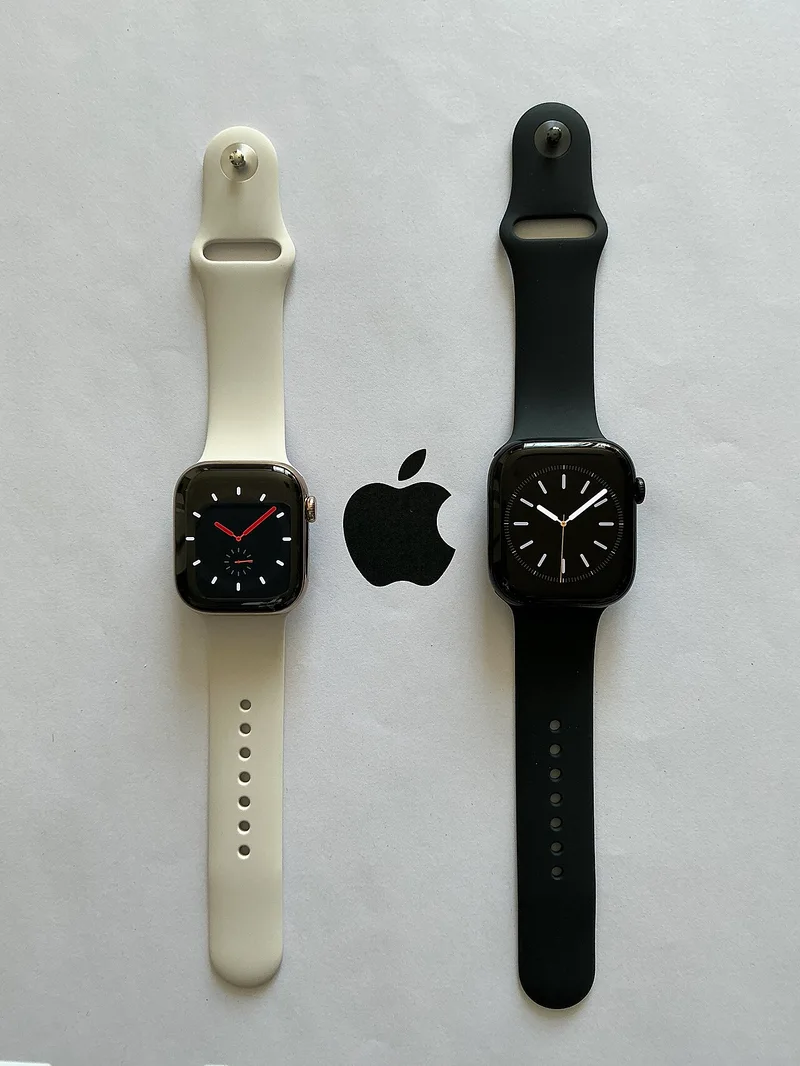
The Apple Watch Series 10's headline change doesn't show up in a spec-sheet comparison the way a new sensor would: it's simply thinner than every Apple Watch before it, with a case depth reduced enough to be immediately noticeable to anyone upgrading from a Series 6, 7, or 8. For a device worn against the wrist all day, that physical change affects comfort more than most software features ever could, and it's a reminder that industrial design improvements sometimes matter more in daily use than a new headline sensor would.
Display and case: small numbers that add up to a real difference
The display grew slightly while the case got thinner, aided by narrower bezels, and it's now viewable at a wider angle — genuinely useful for reading a message or checking the time without rotating your wrist fully toward your face, a small but frequent annoyance on older models that most owners had simply learned to work around rather than thinking of as a fixable flaw. The larger display also gives watch faces with more information density — multiple complications, more legible text — room to breathe without feeling cramped, which matters for anyone who relies on the watch face itself as a quick dashboard rather than opening individual apps throughout the day.
Charging speed finally addresses a long-standing complaint
Charging speed improved enough to make a real dent in Apple Watch's biggest long-standing complaint: a fast top-up gets the watch to a meaningful battery percentage in well under 15 minutes, making it realistic to charge briefly during a morning routine and still track sleep the following night, a workflow that was impractical on earlier generations where a comparable charge took closer to 30-45 minutes. For anyone who has struggled with Apple Watch's dual demands of wearing it overnight for sleep tracking and also keeping it charged, the improved charging speed is arguably a bigger quality-of-life change than any single new feature, since it removes a genuine daily friction point rather than adding a new capability most people use occasionally.
Sleep apnea notifications: background health monitoring done right
Series 10 also added a temperature-based sleep apnea notification feature, cleared through regulatory channels in supported regions — it won't diagnose sleep apnea on its own, but flags a pattern worth discussing with a doctor, joining irregular heart rhythm and fall detection as background health monitoring that runs without any user action required. This category of feature is arguably where Apple Watch has built its strongest long-term case against competing wearables: not flashy single-use gadgets, but quiet, continuous monitoring that occasionally surfaces something worth a doctor's visit, running entirely in the background without the user having to remember to check anything.
Durability changes that matter for active wearers
Series 10 also introduced a new sapphire crystal option and improved water resistance ratings on select case materials, extending the watch's suitability for swimming and water sports without needing a separate rugged model. For active wearers who previously hesitated to wear an Apple Watch during workouts involving water contact, this closes a gap that competing fitness-focused wearables had held over Apple Watch for several generations. The titanium case option, carried over and refined from previous generations, remains meaningfully lighter than stainless steel while retaining most of its scratch resistance, a combination that matters more the longer you intend to wear the watch daily without a case or screen protector.
App ecosystem and third-party watch faces
watchOS's third-party app ecosystem has matured considerably since the platform's early years, when most non-Apple watch apps felt like stripped-down companions to their iPhone counterparts rather than genuinely useful standalone tools. Fitness apps, translation tools, and productivity apps built specifically for the larger Series 10 display take advantage of the extra screen real estate in ways that weren't really possible on smaller earlier models, and the improved battery efficiency means running a demanding third-party app for an extended period no longer drains the battery as aggressively as it once did. This ecosystem maturity is a less flashy improvement than any single hardware spec, but it compounds with every watchOS update in a way that a single generation's hardware review can't fully capture.
How it compares to Samsung's ecosystem
For buyers weighing Apple's approach against Samsung's competing smartwatch lineup rather than assuming the choice is purely about the watch itself, our Apple Watch vs Galaxy Watch ecosystem comparison is worth reading — the real decision for most buyers ends up being about phone ecosystem lock-in as much as the watch hardware itself, since both watches work meaningfully better paired with their own phone brand than with a competitor's.
Beyond the smartwatch category entirely
It's also worth understanding how Apple Watch's always-on health tracking compares to dedicated fitness-focused wearables that trade general smartwatch features for deeper, more specialized tracking — our fitness trackers explainer on Oura Ring and Whoop covers what those more specialized devices actually measure that a general-purpose smartwatch like the Apple Watch doesn't prioritize as heavily, which is a genuinely useful comparison for anyone whose primary interest is deep sleep or recovery metrics rather than notifications and app support.
Who should actually upgrade
For Series 8 or 9 owners, the case change is genuinely incremental, and the core day-to-day experience is close enough that waiting another generation is a completely reasonable choice, especially for anyone who already has a routine that works around the older charging speed. For anyone still on a Series 6 or older, though, the combined effect of the new case, display, and charging speed adds up to the most noticeable single-generation jump since Apple introduced the larger, flatter-edged case design — and for anyone whose current watch is showing battery degradation after several years of daily wear, this is a particularly good point in the product cycle to make the jump, since the improvements compound rather than being a single isolated upgrade. It's also worth thinking about how long you intend to keep the next watch, since Apple Watch resale value and software support both tend to hold up well for several years past purchase — a detail worth weighing against a similar upgrade-timing question for phones, where our phone upgrade-cycle guide covers the same trade-off from a different angle.