Microsoft Surface Pro 13-inch and Surface Laptop Move to Snapdragon X2
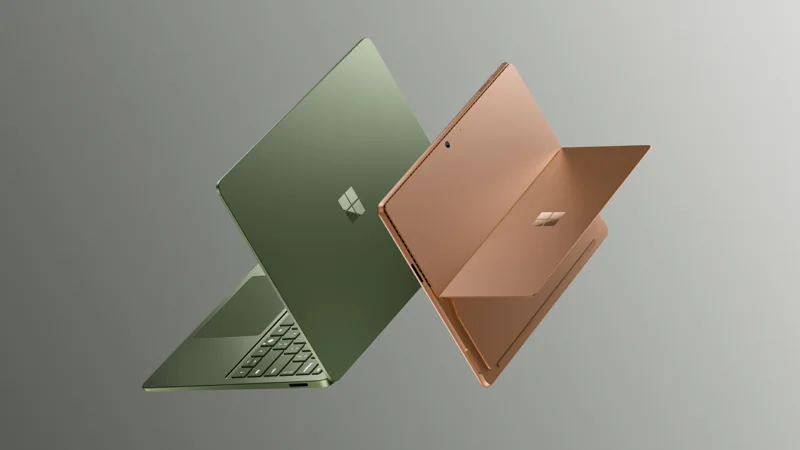
Microsoft has refreshed its two core Windows devices with the Qualcomm Snapdragon X2 platform. The new Surface Pro 13-inch and Surface Laptop were announced on June 16 and went on sale that day, with Surface for Business availability beginning July 14. The pitch is longer battery life, a better camera, a new haptic touchpad and a much more serious approach to repair. Here is what Microsoft actually said, and how to think about whether either machine deserves a place on your desk.
The lineup and the prices
There are three configurations to know about. The Surface Pro 13-inch starts at $1,499 and comes in Platinum, Black and Dune. The Surface Laptop 13.8-inch starts at $1,599 and adds a new Jade color to the same three. A Surface Laptop 15-inch is offered in Platinum, Black and Dune, though the launch post does not give a separate starting price for it. Microsoft's post does not list memory or storage tiers or port details, so check the configurator before you decide.
At launch, Microsoft also ran promotions from June 16 to June 30: a free Surface Pro Keyboard with the Pro, a free Surface Arc Mouse with a Laptop, half off the Microsoft Complete protection plan and trade-in credit of up to $900. Those windows have closed.
Battery life and performance claims
Battery estimates are the strongest argument for Arm-based Windows machines. Microsoft rates the Surface Pro at up to 15.5 hours, the 13.8-inch Surface Laptop at up to 20 hours and the 15-inch Surface Laptop at up to 19 hours. Graphics performance is said to be up to 53 percent faster than the previous generation on the Pro and up to 58 percent higher on the Laptop. The specific TOPS figure for the neural processor was not given in the announcement, though Microsoft says dedicated NPU silicon allows local inference and that workloads can move between the device and the cloud.
These are manufacturer estimates from Microsoft's own testing, and real-world results depend on brightness, workload and what runs in the background. Our explainer on why battery numbers rarely match daily use is worth a read before you treat 20 hours as a promise. For a broader view on what NPUs are for in a laptop, see our NPU explainer.
Displays: OLED on the Pro, sharper LCD on the 15-inch
The Surface Pro offers an optional OLED display, which Microsoft describes as having deeper blacks, higher contrast and greater color accuracy. The 13.8-inch Laptop uses a bright, color-accurate LCD, and the 15-inch Laptop's LCD is sharper than before, moving from 201 to 262 pixels per inch. If you are undecided between panel types, our comparison of OLED and mini-LED laptop displays covers the practical trade-offs, from black levels to brightness and battery use.
Both devices also get a better camera. The Pro has a 1440p Quad HD camera with an ultrawide field of view, and Microsoft says the Laptop's camera was ranked first by DXOMARK. Video-call quality is a factor that people notice every day, so this is a helpful upgrade for hybrid workers, and our guide to laptop webcam quality explains what separates good cameras from average ones.
Haptics: a touchpad and a pen that push back
The most novel part of the launch is haptic feedback. On the Laptop it is built into the touchpad, and on the Pro it is built into the Slim Pen. Microsoft says the feedback gives a tactile response for actions like window snapping, video scrubbing and creative apps, and it is integrated into Windows 11. The idea is that the feeling of a click or a snap gives you confirmation without needing to look. It will be up to individual users to decide whether that adds real value, but the concept is well established on phones, as we discuss in our explainer on how phone haptics work. For what to look for in touchpads more generally, see our guide to laptop trackpads.
Repairability and sustainability
A less flashy but notable addition is the Surface Repair Tool, a guided workflow for fixing devices. Microsoft says the eligible parts include the battery, display, touchpad and motherboard. The devices also come with a 60-day return policy and a one-year manufacturer warranty. Environmental claims include a 100 percent recycled aluminum enclosure, 86 percent recycled content in the Pro and 64 percent in the Laptop, and ENERGY STAR certification with efficiency better than the baseline by at least 50 percent.
Repair-friendliness should matter when you pay this much for a machine you may keep for years. Even so, guided repair is not the same as consumer-replaceable parts, so read the repair policy for your country and how much a battery replacement costs before assuming the best.
Software and the Windows on Arm question
Microsoft pins a bundle of Affinity design, photo and publishing apps to the Start menu on these devices. The larger question with any Snapdragon PC has always been app compatibility, particularly for older or niche software, peripherals with unusual drivers and some games. The situation has improved a lot, but it is still smart to verify every critical app you rely on before buying. Our review of Windows on Arm and Copilot+ PCs covers what has improved and what still needs care.
Surface Pro or Surface Laptop?
Choose the Pro if you want a tablet that becomes a laptop, value pen input or want the optional OLED. Microsoft's launch promotion gave the keyboard away free, so check whether it is bundled or extra where you shop, and read about the trade-offs in our piece on when 2-in-1 laptops are worth it. Choose the Laptop if you spend most of your time typing, want the longest battery estimate and would rather have a traditional clamshell. Between the two sizes, the 13.8-inch is the more portable and the 15-inch offers extra screen area and a sharper panel than before.
The practical takeaway
These are $1,499 and up machines whose selling points are battery life, a better camera, haptics and repair support. Before buying, test the apps you depend on, choose your memory and storage carefully, since the announcement did not list the tiers or say whether they can be changed later, and check for current promotions, since the launch offers have ended. If you already own the previous generation, the improvements are incremental rather than urgent. If you are moving from an older Intel machine and mostly use web, Microsoft 365 and creative apps, this is a strong contender.