Nintendo Switch 2 vs Steam Deck: Which Handheld Should You Actually Buy
Handheld gaming has split into two distinct philosophies, and the Nintendo Switch 2 and Steam Deck represent them about as clearly as any two devices could. One is a first-party console experience built around Nintendo's own curated library and a hybrid dock-and-go design. The other is essentially a portable gaming PC that happens to run a controller-friendly interface, giving it access to a much larger, less curated library. Picking between them means deciding which of those two experiences actually matches how you play.
What each device is actually built to do
The Switch 2 continues Nintendo's hybrid approach: a handheld that docks to a TV for full-screen play, with Joy-Con controllers that detach for local multiplayer or a more traditional controller grip. Its hardware is tuned specifically to run Nintendo's own games and a curated selection of third-party titles well, rather than to be a general-purpose gaming computer. That focus means better battery life and thermal efficiency for the games it's designed around, at the cost of not being able to run much of anything outside Nintendo's ecosystem.
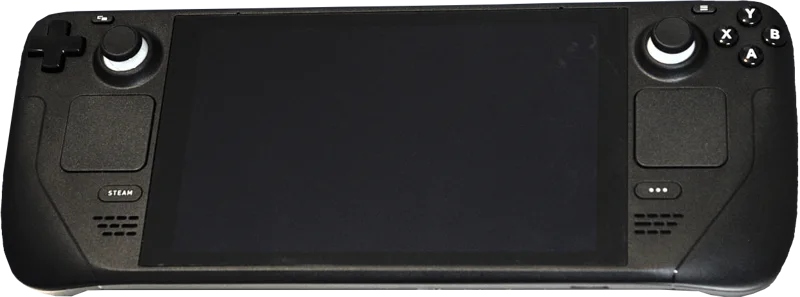
The Steam Deck is fundamentally different hardware wearing a handheld's shape: a real x86 PC running a Linux-based operating system with SteamOS's controller-friendly interface layered on top. That architecture means it can run the enormous existing PC game library on Steam, not a curated subset chosen by a single company, along with actual PC software if you're willing to switch out of gaming mode. The tradeoff for that flexibility is less optimized battery life in unsupported titles and inconsistent performance across a library that wasn't designed with a handheld in mind.
Game library is the real deciding factor
If the games you want to play are Nintendo exclusives — first-party platformers, RPGs, and franchises that only exist on Nintendo hardware — the Steam Deck simply cannot provide that experience regardless of its other strengths, since those games aren't available on PC. That makes the Switch 2 a non-negotiable purchase for fans of those franchises, independent of any hardware comparison.
If your existing game library or gaming interest is centered on PC titles — a Steam library built up over years, ongoing live-service games, or genres like strategy and simulation that are underrepresented on Nintendo platforms — the Steam Deck gives you access to that entire existing library in a portable form factor, something the Switch 2 fundamentally cannot replicate.
Performance and how well games actually run
The Switch 2's hardware is modest by raw power standards but its games are built specifically around those constraints, meaning Nintendo's own titles typically run at a stable frame rate and resolution without the stuttering or settings-tweaking that PC gaming sometimes requires. The Steam Deck's performance is more variable: some games run beautifully out of the box with Valve's "Verified" compatibility rating, while others require manually adjusting graphics settings to get acceptable performance, since not every PC game in the library was built with a handheld's power and thermal limits in mind.
Battery life and how long you can actually play
The Switch 2 generally delivers longer battery life for the games it's optimized around, since Nintendo controls both the hardware and the specific software running on it. The Steam Deck's battery life varies dramatically depending on the game — a lightweight indie title might run for several hours, while a demanding recent release can drain the battery in under two hours, making it less predictable for long trips or extended sessions away from a charger.
Build quality, screen, and day-to-day comfort
The Switch 2's design continues Nintendo's tradition of durable, kid-friendly hardware with a screen tuned for handheld visibility and detachable controllers that add genuine flexibility for local multiplayer. The Steam Deck is bulkier and heavier in hand, a real tradeoff for extended handheld sessions, though Valve has iterated on ergonomics with grip contours that make the extra weight more manageable than it initially seems on paper.
Price and the real cost of building a library
The Switch 2's price covers the hardware alone, and Nintendo's own games rarely go on deep discount the way PC titles do, meaning the ongoing cost of building a library can add up quickly if you're buying first-party titles at or near full price. The Steam Deck's upfront price is comparable depending on storage configuration, but Steam's frequent sales, bundles, and the sheer size of its existing back catalog mean the effective cost of building an equivalent-sized game library is often significantly lower over time, especially for anyone patient enough to wait for a seasonal sale rather than buying at launch.
Accessories add up differently on each platform too. The Switch 2's dock, extra Joy-Cons, and carrying cases are part of an established accessory ecosystem with predictable pricing. The Steam Deck's accessory market is smaller and more third-party-driven, though official docks and cases from Valve cover the essentials without much hunting required.
Software updates and long-term support
Nintendo has historically supported its hardware with years of first-party software releases and firmware updates, and the Switch 2 will likely follow that same long support pattern given the company's track record. The Steam Deck benefits from Valve's ongoing SteamOS development, which has steadily improved compatibility and performance since launch through software updates alone, meaning games that ran poorly at release sometimes run meaningfully better a year or two later without any hardware changes — an advantage unique to its PC-based architecture that a fixed-purpose console can't replicate in quite the same way.
The actual recommendation
Buy the Switch 2 if Nintendo's exclusive library is part of why you play games at all, or if you want a more polished, consistent experience without tinkering with settings. Buy the Steam Deck if you already have or want access to a large PC game library, care about genres underrepresented on Nintendo platforms, or want a device flexible enough to eventually do more than just gaming. Plenty of serious handheld gamers end up owning both, precisely because they solve genuinely different problems rather than competing head-to-head for the same use case.