Wi-Fi 7 on Laptops Explained: What the New Wireless Standard Actually Changes
Wi-Fi 7 laptops have been showing up on spec sheets since 2024, usually listed as a bullet point next to the processor and RAM configuration without much explanation of what it actually changes. The short version is that Wi-Fi 7, formally known as 802.11be, is a genuinely significant jump over Wi-Fi 6E, but almost none of its headline benefits show up unless your router, your internet plan, and your usage pattern all line up in specific ways, which makes it one of the easiest specs to overpay for without getting anything different in daily use.
What actually changed from Wi-Fi 6E
Wi-Fi 6E's main contribution was opening up the 6GHz band, a wide stretch of largely uncongested spectrum free of the interference that clogs the older 2.4GHz and 5GHz bands in crowded apartment buildings and offices. Wi-Fi 7 keeps that same 6GHz access but adds three specific technical upgrades on top of it. First, channel widths can now reach 320MHz, double the 160MHz ceiling of Wi-Fi 6E, which directly increases the maximum theoretical throughput available on a single connection. Second, it introduces 4K-QAM modulation, a denser way of encoding data into each radio signal that squeezes more bits into the same amount of spectrum when signal quality is strong. Third, and most practically useful, it adds Multi-Link Operation (MLO), which lets a device connect across multiple bands, 2.4GHz, 5GHz, and 6GHz, simultaneously rather than picking just one and switching between them when conditions change.
MLO is the feature most likely to matter for a laptop specifically, more than the headline throughput numbers. Because a laptop's Wi-Fi connection can now draw on more than one band at once, it can shift traffic to whichever band currently has the least interference or congestion in real time, without the brief connection drop that happens when older Wi-Fi standards hand off between bands. In practice that shows up as noticeably fewer stutters during video calls in a crowded office or apartment building, rather than as a dramatic jump in raw download speed for most everyday tasks.
Why the theoretical speed numbers rarely apply
Marketing materials for Wi-Fi 7 routers and laptops often cite multi-gigabit theoretical maximums, numbers that sound dramatically faster than what any home internet plan actually delivers. Those figures describe the ceiling of the wireless link between your device and the router under laboratory conditions, not your actual internet speed, which is still capped by whatever your ISP provides. A laptop with a Wi-Fi 7 adapter connected to a 300Mbps home internet plan will still only get roughly 300Mbps, the wireless standard isn't the bottleneck in that scenario at all. The place Wi-Fi 7's raw speed actually matters is local network transfers that never touch the internet, moving large files between a laptop and a NAS drive or another computer on the same network, where the wireless link itself is genuinely the limiting factor and a faster standard translates directly into faster transfers.
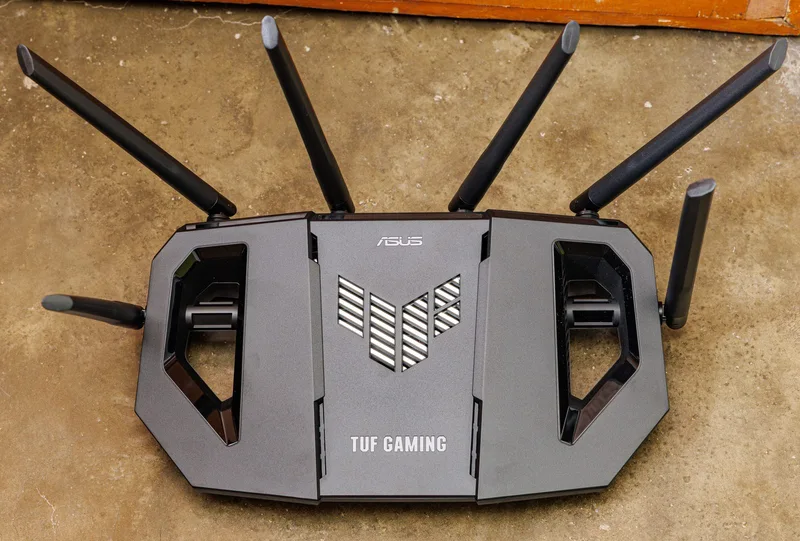
Getting even the more realistic gains requires both ends of the connection to support Wi-Fi 7, which means a Wi-Fi 7 laptop paired with an older mesh Wi-Fi system or a router still running Wi-Fi 6 gets none of the new standard's benefits, it simply negotiates down to whatever the router supports. Wi-Fi 7 routers remain meaningfully more expensive than Wi-Fi 6E equivalents, and most internet service provider-supplied routers still don't support the standard at all, which is the single biggest reason most people with a Wi-Fi 7 laptop today aren't actually using Wi-Fi 7 for their internet connection.
Who actually benefits right now
The clearest beneficiaries are people working in dense wireless environments, open-plan offices with dozens of competing devices, apartment buildings where every neighbor's router is fighting for the same channels, or households running several 4K streaming devices, video calls, and smart home gadgets simultaneously. In those specific conditions, Wi-Fi 7's combination of MLO and wider 6GHz channel access produces a genuinely more stable connection with less latency variation, which matters far more for things like video calls and online gaming than raw peak throughput ever does. Anyone doing frequent large local file transfers, video editors moving raw footage from a network drive, for instance, is the other group likely to notice a real difference, assuming they've also invested in a Wi-Fi 7 router and a NAS fast enough to actually saturate the connection.
For a typical laptop buyer working from a single-family home with a handful of devices and a common broadband speed under a gigabit, Wi-Fi 7 support is a nice-to-have rather than something worth paying a premium for or basing a purchase around. It's increasingly bundled in as standard equipment on premium laptop configurations anyway, arriving alongside other next-generation connectivity standards like Thunderbolt 5 as manufacturers refresh their wireless chipsets, which means most buyers will end up with it eventually without seeking it out specifically, similar to how Wi-Fi 6E quietly became standard equipment a couple of years after its debut.
Battery life and compatibility considerations
One underappreciated tradeoff is that Wi-Fi 7 radios, particularly when actively using Multi-Link Operation across multiple bands at once, draw somewhat more power than a simpler single-band connection, though chipmakers have made real progress narrowing that gap compared to early Wi-Fi 6E implementations. For a laptop optimized heavily around battery life, this is a minor but real consideration, on the same order of magnitude as other wireless radio tradeoffs rather than anything that meaningfully changes a laptop's all-day battery claims. Backward compatibility isn't a concern either way: a Wi-Fi 7 laptop connects fine to older routers, and an older laptop connects fine to a new Wi-Fi 7 router, both simply operate at whichever standard is common to both devices, the same graceful fallback behavior every prior Wi-Fi generation has supported.
The bottom line
Wi-Fi 7 is a real, meaningful upgrade to the wireless standard, not just a marketing refresh of Wi-Fi 6E, built around Multi-Link Operation, wider channels, and denser signal encoding that genuinely reduce congestion and latency variability under the right conditions. But those benefits depend entirely on having a Wi-Fi 7 router on the other end and being in one of the specific situations, dense interference environments or fast local network transfers, where the new standard's advantages actually show up. For most laptop shoppers today, it's a reasonable feature to have if it comes included at no meaningful price premium, but not yet a spec worth chasing on its own, the same way NPU performance was a nice inclusion before software caught up to actually use it well.