New Mac mini and Mac Studio Are Available Now
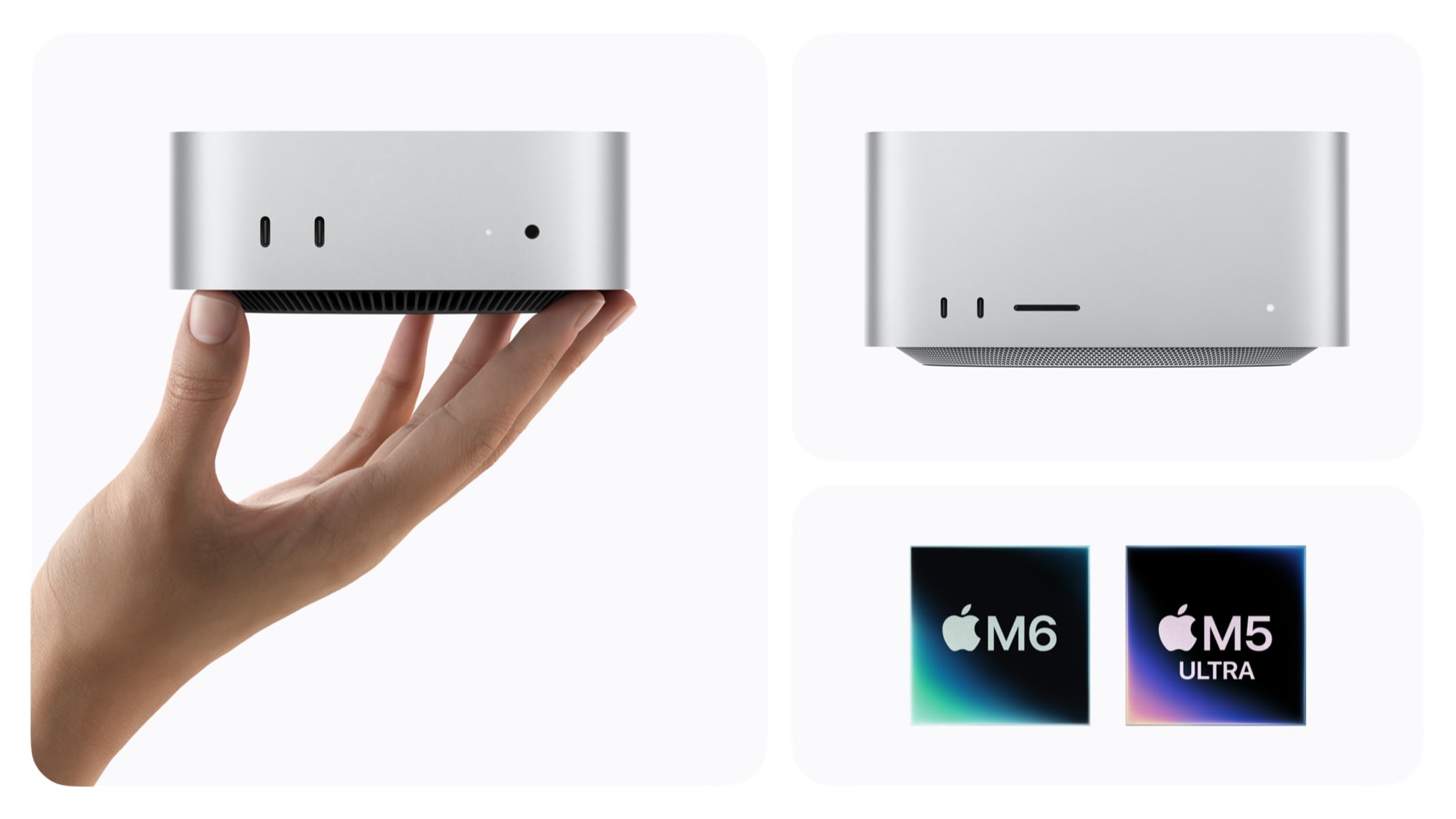
Apple's newest desktops have started arriving. On September 22 the company said the new Mac mini, with the all-new M6 chip or an M5 Pro, and the new Mac Studio, with an M5 Max or the all-new M5 Ultra, are available at Apple Store locations, on apple.com and through Apple Authorized Resellers. Prices start at $899 for the Mac mini with M6 and run to $5,499 for the Mac Studio with M5 Ultra. This guide explains what the lineup offers, which version suits which buyer and what to verify before you order. For reference to this page, here is our Mac mini and Mac Studio availability guide. All specifications and prices come from Apple's newsroom update, and Apple's performance claims are the company's own comparisons, not independent tests.
The lineup at a glance
Apple is selling four starting configurations across two machines. The Mac mini with M6 starts at $899 and the Mac mini with M5 Pro at $1,699. The Mac Studio with M5 Max starts at $2,499 and the Mac Studio with M5 Ultra at $5,499. Education pricing, available exclusively from Apple, starts at $799 and $1,599 for the two Mac mini models and $2,299 and $5,099 for the two Mac Studio models. Apple also notes that configure-to-order options are available for size, chip, memory, storage and display height. One timing detail matters: Apple says the Mac Studio with 512GB of unified memory is coming in late October rather than on day one.
Mac mini: the versatile one
Apple calls the Mac mini its most versatile Mac and aims it at everyday consumers, students, creatives and small business owners. The M6 version is described as having a 12-core CPU, a 12-core GPU with a Neural Accelerator in every core and a new Dual 16-core Neural Engine. Apple claims up to 4x faster AI performance, 2x faster graphics and storage and 40 percent faster CPU performance, though the company does not say on the page which prior Mac mini each figure is measured against, and it says testing was done in August 2026 against shipping competitive systems and industry-standard benchmarks. Treat the numbers as marketing until independent reviews arrive.
Memory starts at 16GB of unified memory and can be configured up to 32GB, with memory bandwidth up to 170GB/s on M6. The M5 Pro version offers up to an 18-core CPU and a 20-core GPU, with up to 64GB of unified memory and 307GB/s of bandwidth, aimed at video production and game development. Connectivity on both includes Wi-Fi 7, Bluetooth 6 and 2.5Gb Ethernet, with a 10Gb option.
Mac Studio: the heavyweight
The Mac Studio is aimed at professionals. With M5 Max it has an 18-core CPU, up to a 40-core GPU and up to 128GB of unified memory. The M5 Ultra version goes to an up-to-36-core CPU, an up-to-80-core GPU and up to 512GB of unified memory with 1.2TB/s of bandwidth. Apple says this enables things like color-grading uncompressed 8K footage in real time, rendering complex scenes and running very large language models entirely on the device. Apple claims up to 4.3x faster AI performance and up to 1.8x faster graphics for the Studio, again measured by its own methodology.
Both Studio models have Thunderbolt 5 with speeds up to 120Gb/s. Apple highlights Thunderbolt 5 with Remote Direct Memory Access, which allows multiple Mac Studio systems to be clustered, and it says that brings up to 3x faster performance for distributed AI inference compared with a single system. The Studio supports up to eight displays, or up to four Studio Display XDR at full 5K resolution and 120Hz.
Software: macOS 27 and Siri AI
Both machines ship with macOS 27, which Apple calls Golden Gate. The headline feature is Siri AI, which Apple says draws on personal context across messages, email and photos, is built into Spotlight and context menus, and can answer questions about what is on screen with Visual Intelligence through a keyboard shortcut. Apple also lists Safari tools that group tabs into topics and notify you of site changes such as restocks or price drops, plus a slider to adjust the Liquid Glass look. Apple says Siri AI is rolling out in beta, starts in English and requires a supported language and an Apple Intelligence-enabled device. It will not be initially available in the EU on iOS, iPadOS and watchOS, and certain server-based features have daily usage limits with expanded access possibly available for a fee in the future.
Who is this for
- Mac mini with M6. Students, home-office users, anyone who wants a quiet and small desktop for everyday work, and developers who want an always-on box. Apple highlights it for agentic AI workflows and always-on computing.
- Mac mini with M5 Pro. Video editors, game developers and music producers who need more cores and up to 64GB of memory without moving up to a Studio.
- Mac Studio with M5 Max. Photographers, 3D artists and engineers who want a pro desktop with room for many displays and fast Thunderbolt 5 storage.
- Mac Studio with M5 Ultra. A narrow group: filmmakers working in 8K, VFX artists and researchers who truly need hundreds of gigabytes of memory, or those clustering multiple machines.
What to check before buying
- Choose memory carefully. Apple offers unified memory as a configure-to-order choice, and the announcement does not describe any later upgrade path, so assume you decide at purchase. The base 16GB on the Mac mini may feel tight for heavy local AI work, so look at the 32GB option.
- The 512GB Studio is delayed. If you need that capacity, plan for late October, according to Apple.
- Total cost. The desktop does not include a display, keyboard or mouse. Studio Display and Studio Display XDR are sold separately.
- Ethernet and ports. Mac mini offers 2.5Gb Ethernet with a 10Gb option. If you need faster networking at the desk, choose it at configuration.
- Siri AI availability. If you live in the EU or need non-English support, check Apple's feature list for your region.
- Financing and leasing. Apple Upgrade leasing is offered to eligible U.S. customers on Mac Studio, with lease prices starting at $48.99 per month for M5 Max and $110.10 per month for M5 Ultra over 36 months, excluding taxes and trade-in credit. Apple Card Monthly Installments are subject to credit approval.
Trade-ins and support
Apple points customers to Apple Trade In, year-round education pricing, personal setup services, Shop with a Specialist over Video, a dedicated Business Team for small and medium-sized businesses and free Today at Apple sessions. None of these change the hardware, but business buyers and first-time Mac users may find the setup help useful.
Weak points and open questions
Apple's performance claims lack baselines on the newsroom page and come from internal testing. We do not have battery, thermal or fan-noise data, since desktops were not independently measured at announcement. Pricing listed is for the U.S. only, and starting configurations do not include upgrades most pro users will choose. If you already own a recent Apple silicon desktop, the case for upgrading depends on whether your current machine runs out of memory or AI throughput, which only your own workload can show.
Bottom line
Apple's desktop update is available now, with the main caveat being the delayed 512GB Mac Studio. The Mac mini with M6 at $899 is the accessible entry, the M5 Pro version covers serious creative work, and the Mac Studio with M5 Max or M5 Ultra is a professional tool priced like one. Read independent reviews for real-world numbers, and configure memory carefully at order time.