External GPUs (eGPUs) Explained: When Plugging In a Graphics Card Actually Makes Sense
A thin, light laptop and a powerful graphics card have always been fundamentally at odds: real GPU performance needs power delivery and cooling that fights directly against everything that makes a laptop portable. An external GPU enclosure, usually just called an eGPU, is the workaround that's existed for close to a decade now, letting a laptop connect to a full desktop graphics card sitting in a box on your desk. It's a niche product, but for the right kind of laptop owner, it solves a real problem that no amount of internal engineering can.
What an eGPU actually is
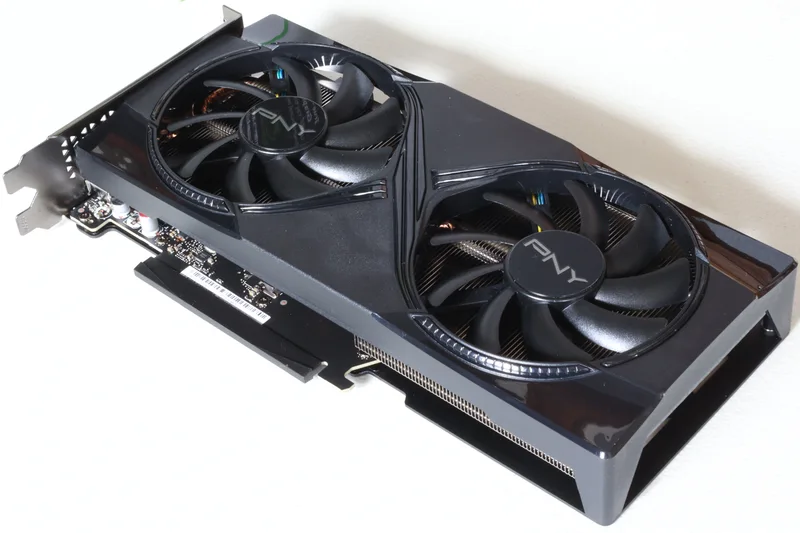
An eGPU enclosure is a case, usually with its own power supply, that holds a standard desktop graphics card and connects to a laptop over a single cable, almost always Thunderbolt or, increasingly, USB4. Inside the box is completely ordinary desktop hardware; you buy and install a regular graphics card, the same kind you'd put in a desktop tower, and the enclosure handles routing power to it and connecting it back to the laptop's ports. Some enclosures come bundled with a GPU already installed, but most are sold empty, closer to a shell you populate yourself, similar in spirit to buying a case and then a graphics card separately for a desktop build.
The laptop sees the external card as an additional GPU once drivers are installed, and modern operating systems let you choose which applications use it, similar in concept to how a gaming laptop with both integrated and dedicated graphics lets you assign specific apps to specific GPUs.
The bottleneck nobody advertises
The single most important thing to understand about eGPUs is that the connection between the laptop and the enclosure is a real bottleneck, and it never fully disappears no matter how fast the cable standard gets. A desktop graphics card installed directly on a motherboard communicates over a PCI Express slot with far more bandwidth than any external cable currently offers; Thunderbolt and USB4 provide a fraction of that internal bandwidth, and that gap shows up as a real, measurable performance loss compared to the same graphics card installed inside an actual desktop. In practice, that typically means an eGPU delivers meaningfully less performance than the same card would produce in a desktop tower, even though it still represents a massive upgrade over a laptop's built-in graphics.
This is the same fundamental bandwidth ceiling discussed in our piece on integrated versus dedicated laptop graphics, just applied externally instead of internally: however a GPU is connected, the interface carrying data between it and the rest of the system directly caps how much of its raw power actually reaches your games or applications.
Who an eGPU actually makes sense for
The clearest use case is someone who owns a genuinely thin, light laptop for portability and travel, but occasionally wants real gaming or GPU-accelerated performance while at a desk, without buying and maintaining a second full computer. A creative professional working with an ultraportable laptop who needs to run GPU-heavy video editing or 3D rendering software occasionally, but doesn't want that workload dictating the size and weight of the laptop they carry daily, is the other common profile. In both cases, the eGPU turns a single portable laptop into something closer to a full desktop workstation the moment it's docked, without permanently compromising the laptop itself.
It makes far less sense as a primary gaming setup if you have any choice in the matter. A dedicated gaming laptop or desktop will simply deliver more performance per dollar than a laptop plus an eGPU enclosure plus a graphics card, since you're paying extra for the enclosure itself and losing performance to the connection bottleneck on top of that. The eGPU's real value is flexibility, not raw price-to-performance efficiency.
Compatibility is the real hurdle
Not every laptop can use an eGPU, and this is where most buyers run into trouble. The laptop needs a Thunderbolt or USB4 port specifically rated for external graphics, not just any USB-C port, since ordinary USB-C ports lack the PCI Express data tunneling that eGPU communication depends on. Older laptops with only Thunderbolt 3 can still work, but newer Thunderbolt 5 and USB4 ports generally offer better sustained bandwidth to the enclosure, narrowing that performance gap somewhat compared to older standards. It's also worth checking a laptop manufacturer's own compatibility list before buying, since some thin laptops technically have the right port but don't officially support external graphics due to internal power or driver limitations.
On the software side, Windows has the most mature eGPU support of any major operating system, with drivers generally handling detection and app assignment reliably. Setup is far more limited and inconsistent on other platforms, where support has historically been unofficial, restricted to specific older hardware generations, or dropped entirely in newer releases, which is worth checking carefully before assuming an eGPU will work with a non-Windows laptop.
What an eGPU actually unlocks in practice
Beyond raw frame rates, the more interesting use case for a lot of eGPU owners is unlocking specific rendering features that a laptop's built-in graphics simply can't run at a usable speed. Real-time ray tracing, for instance, is punishingly demanding on GPU hardware, and it's often the single feature that pushes someone from "my laptop's integrated graphics are fine" to actively shopping for an eGPU, since even a mid-range desktop card in an enclosure can run ray-traced lighting at playable frame rates that a thin laptop's internal graphics chip never could. The same logic applies to GPU-accelerated video export, 3D rendering previews, and machine-learning workloads that benefit from a desktop-class card's larger pool of dedicated video memory, which is typically far more generous than what fits inside a laptop's thermal and power budget.
It's also worth noting that plugging in an eGPU can, on many setups, simultaneously charge the laptop and drive one or more external monitors through the same enclosure, depending on the specific ports the enclosure exposes. That turns the eGPU into a de facto docking station as well as a graphics upgrade, which is part of why some buyers justify the expense as replacing two separate desk accessories rather than as a pure gaming purchase.
Cost reality check
The full cost of going the eGPU route adds up faster than it first appears: the enclosure itself, a separate graphics card purchase if the enclosure doesn't include one, and the fact that graphics cards depreciate and get replaced by newer generations just like any other GPU. Buyers should budget for the enclosure as a long-term investment separate from the card inside it, since a good Thunderbolt eGPU enclosure can outlast two or three GPU upgrade cycles if it continues to meet your bandwidth needs. For most people who don't already own a laptop with the right ports and a genuine occasional need for desktop-class graphics, a dedicated gaming laptop remains the simpler, more cost-effective answer; the eGPU is a specialist's tool for a specific, real problem, not a general-purpose upgrade path.