Steam Deck OLED: Is the Screen Upgrade Worth It?
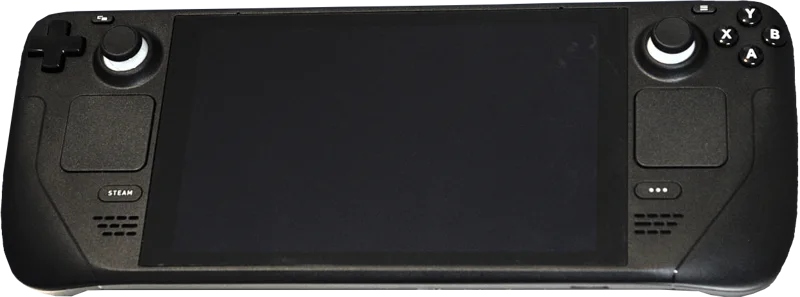
When Valve released the Steam Deck OLED as a mid-cycle refresh rather than a true "Steam Deck 2," a lot of the initial reaction focused on what didn't change: the same processor, the same core performance envelope, the same button layout. The headline upgrade was, quite literally, the screen. That's a harder sell than a generational leap in raw power, but after months of real use, the OLED panel turns out to be the single component upgrade that changes how the device actually feels to use, day to day, more than any spec bump would have.
What Actually Changed
The original Steam Deck's LCD panel was a perfectly competent 7-inch, 1280x800 display — nothing wrong with it, but nothing that stood out either. The OLED model swaps this for a 7.4-inch HDR-capable OLED panel with true blacks, a wider color gamut, and a 90Hz refresh rate (up from 60Hz). Valve also quietly increased the battery capacity by roughly 20%, improved the thermal design enough to run slightly cooler under sustained load, and switched to a faster Wi-Fi 6E radio — none of which get the same attention as the screen, but all of which add up to a device that's more pleasant to hold for a four-hour flight.
Why OLED Matters More on a Handheld Than a TV
On a living room TV, LCD-versus-OLED arguments are often about diminishing returns — you're sitting far enough away, and modern mini-LED backlighting has closed much of the contrast gap. On a handheld gaming device held 12-18 inches from your face in every kind of ambient lighting, from a dark bedroom to direct sunlight on a train, OLED's per-pixel light control matters in a much more immediate way. Games with dark, atmospheric art direction — which describes a huge share of the Steam library, from horror titles to moody indie platformers — genuinely look like a different, more polished product on the OLED panel. Black backgrounds render as actual black rather than the slightly gray "LCD black" that's been a compromise gamers have quietly accepted for two decades of handheld gaming.
The 90Hz refresh rate is the other half of the equation, and it's arguably underrated relative to the screen technology itself. Not every game on the Steam Deck can sustain 90 frames per second — the Deck's APU is still the same performance tier as the original — but for titles that can, especially lighter 2D and indie games, the smoothness difference is immediately noticeable in a way that's hard to go back from once you've felt it.
Battery Life: The Quiet Win
Valve's battery capacity increase, combined with the OLED panel's power efficiency advantage in darker scenes (OLED pixels that render black simply don't draw power, unlike an LCD's backlight which stays lit regardless of what's on screen), translates to a genuinely meaningful real-world battery life improvement — commonly cited at 30-40% longer runtime for the same game at the same settings, depending on how dark the game's visuals are. For anyone who's had the original Deck die mid-flight on a long-haul trip, this is a bigger quality-of-life change than the screen upgrade gets credit for.
What Didn't Change (And Why That's Fine)
The Steam Deck OLED runs the exact same AMD APU as the original — same CPU cores, same RDNA 2 graphics architecture, same overall performance ceiling. Valve made a deliberate choice not to chase a performance refresh, likely because a mid-cycle CPU/GPU upgrade would have fragmented the platform's performance target for developers optimizing games for "Steam Deck verified" compatibility. This means anyone expecting the OLED model to run more demanding games or hit higher frame rates in CPU-bound titles will be disappointed — this is a comfort and display refresh, not a power refresh, and Valve has been transparent about that positioning from launch.
Is It Worth Upgrading From the Original?
For owners of the original LCD Steam Deck who are happy with its performance, the calculus is genuinely close. The screen, battery life, and weight reduction (the OLED model is around 30 grams lighter, plus a redesigned, more comfortable grip contour) are real, tangible improvements you'll notice in every single session. But none of them make a previous-generation game run better or unlock anything that was previously impossible. If your original Deck still feels good in hand and you're not bothered by LCD blacks, there's a legitimate argument for waiting for whatever Valve does next rather than side-grading for comfort alone.
Price and When to Buy
The Steam Deck OLED launched at the same price tiers as the original LCD model's final pricing, meaning Valve delivered a meaningfully upgraded device without a price increase — a rarity in hardware refreshes generally, and one of the more consumer-friendly moves in the handheld gaming space in recent years. The lineup spans a 512GB model with anti-glare etched glass and a 1TB model with the same finish, both well above the storage ceiling most buyers will actually need given how easily a microSD card expands capacity for less than the cost of upgrading the internal tier.
Deals are relatively rare directly from Valve, but the OLED model does periodically see discounts during major sales events, and the original LCD model has effectively become the budget option for anyone who wants the SteamOS experience without paying for the screen upgrade. If storage and battery life matter more to you than display quality specifically, the LCD model remaining in the lineup at a lower price point is a genuinely sensible way to save money without giving up the core Steam Deck experience.
Is It Worth Buying New Over a Windows Handheld?
Against newer Windows-based handhelds with more powerful APUs, the Steam Deck OLED's case rests entirely on SteamOS: a Linux-based, console-like experience purpose-built for a handheld form factor, versus Windows 11 shrunk down onto a small touchscreen with a controller bolted on. SteamOS's Proton compatibility layer has matured enormously and runs the vast majority of the Steam library without issue, and the whole-device experience — suspend/resume that actually works reliably, a proper big-picture interface, no Windows update interruptions mid-game — remains something competing Windows handhelds still haven't fully matched, regardless of how much more raw GPU power they pack in.