Smart Plugs and Energy Monitors Explained: What They Actually Tell You About Your Power Bill
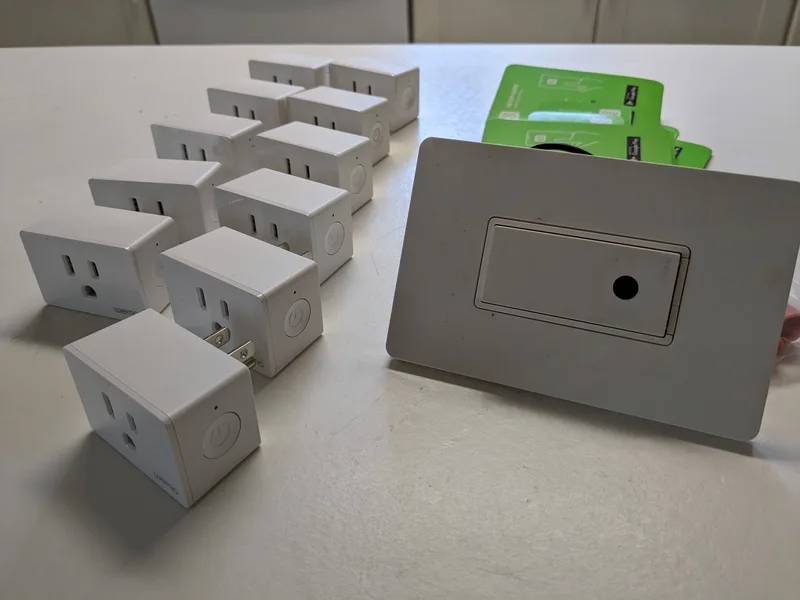
A smart plug is the smallest, cheapest unit of smart home automation: a small adapter that sits between a wall outlet and whatever you plug into it, letting you turn that device on or off remotely, on a schedule, or through a voice assistant. Some models go a step further and add energy monitoring, reporting how much electricity the connected device is actually drawing in real time. That extra data sounds like a straightforward way to cut your power bill, but what it can and cannot tell you is worth understanding before you treat the numbers as gospel.
What a Basic Smart Plug Actually Does
At its core, a smart plug is a remote-controlled switch. It connects to your home Wi-Fi network — or, on newer models, to a Thread or Matter smart home network — and lets an app, a voice assistant, or an automation routine turn the connected outlet on or off. This is genuinely useful for a surprisingly wide range of household chores: turning off a space heater automatically at a set time, scheduling lamps to simulate someone being home while you are away, or making a "dumb" appliance like a fan or a coffee maker voice-controllable without replacing the appliance itself. Because they typically cost far less than a smart bulb or a dedicated smart appliance, plugs are often the cheapest way to get a feel for home automation before committing to a bigger ecosystem, a decision we cover more broadly in our explainer on what Alexa actually does as a smart home hub.
How Energy-Monitoring Plugs Work
Energy-monitoring smart plugs add a small internal sensor that measures the voltage and current flowing to the connected device, calculating power draw in watts in real time and, over time, total energy consumption in kilowatt-hours — the same unit your electricity bill is calculated in. This lets you see, device by device, exactly how much a specific appliance is costing you to run, rather than relying on a single combined number from your utility bill that lumps everything in the house together.
This is where smart plugs become genuinely informative rather than just a convenience gadget. Many people significantly misjudge which devices in their home actually use the most electricity — assuming, for example, that leaving a phone charger plugged in all day is a meaningful drain, when in reality idle chargers draw a tiny, often practically unmeasurable amount of power, while something like an older space heater, a window air conditioner, or an electric water heater can dwarf nearly every other device in the house combined. An energy-monitoring plug replaces that guesswork with an actual number for whatever it is plugged into.
What the Data Is Actually Good For
The most useful application is identifying the small number of "phantom load" or genuinely high-draw devices worth actively managing, rather than trying to micromanage every outlet in the house — a strategy that is rarely worth the effort for low-power devices. A smart plug on a space heater, a window air conditioner, a gaming PC, or an older appliance can reveal real, actionable numbers: exactly how many hours per day it runs, how much that costs at your local electricity rate, and whether a scheduling change or a habit adjustment meaningfully reduces that cost. This pairs naturally with the kind of whole-home efficiency question we cover in our guide to whether a smart thermostat actually saves you money, since heating and cooling remain the largest energy costs in most homes and a thermostat addresses that directly, while a monitoring plug is better suited to isolating specific high-draw appliances rather than whole-house climate control.
Where the Data Falls Short
A smart plug can only monitor what is plugged into it, which means it cannot see hardwired appliances like a central air conditioner, an electric oven, an electric water heater, or most lighting circuits — often the largest consumers of electricity in a home, and entirely invisible to a device that only monitors a single wall outlet. For genuine whole-home visibility, that requires a different category of hardware entirely: a monitor installed at the home's electrical panel, which is a bigger and more involved project than plugging in an adapter.
Accuracy also varies between models and price tiers — budget energy-monitoring plugs are usually accurate enough for identifying broad patterns and comparing devices against each other, but not necessarily precise enough to match your utility bill down to the cent, since actual electricity rates often include tiered pricing, time-of-use rates, and fees that a simple wattage reading does not account for.
Compatibility and the Move Toward Matter
Smart plugs used to be one of the more fragmented corners of the smart home, tied to a specific manufacturer's app and voice assistant with little cross-compatibility. That has been improving as more manufacturers adopt Matter, the cross-platform smart home standard designed to let devices from different brands work together through Amazon Alexa, Google Home, Apple Home, and others without requiring separate apps for each — a shift we cover in detail in our explainer on what Matter actually changes for smart home compatibility. Not every energy-monitoring feature has made the jump to Matter cleanly yet, since the standard's energy-reporting capabilities are newer than its basic on/off control, so it is still worth checking a specific plug's compatibility list if energy monitoring is the feature you actually care about, rather than assuming "Matter compatible" guarantees every feature works identically across every app.
The Bottom Line
A basic smart plug is a cheap, genuinely useful piece of home automation for remote control and scheduling. An energy-monitoring smart plug adds real value on top of that by replacing guesswork about which devices actually cost the most to run with concrete numbers — but it is a tool for identifying and managing a handful of high-draw devices, not a substitute for whole-home energy monitoring or a guarantee of dramatic savings on its own. Used with realistic expectations, it is one of the more useful and lowest-cost entry points into a smarter, more efficient home.