Final Cut Camera 2.4 Adds iPhone 18 Pro Aperture
Apple has released version 2.4 of Final Cut Camera, its professional filming app for iPhone, and the update is the first to let creators control aperture on an iPhone. Announced on September 29, the free update brings a redesigned interface, support for the variable aperture on the iPhone 18 Pro, and more professional tools that arrive with iOS 27, including video scopes, clean SDI output and genlock offset. If you shoot video on an iPhone, or you are thinking about the iPhone 18 Pro mainly for its camera, this guide explains what changed, what each feature is for and what to check before you rely on it. For a short reference to this page, here is our Final Cut Camera 2.4 update guide. Everything attributed to Apple comes from its newsroom update post. Apple does not give performance measurements, file sizes or supported-device lists beyond what we quote, so we do not add any.
What Apple announced
According to Apple, Final Cut Camera 2.4 is a major update that adopts a new design, adds support for variable aperture on iPhone 18 Pro and gives creators more pro options with the release of iOS 27. The new version is a free software update, available from September 29. Apple describes the app as having been redesigned from the ground up, which in practice means its controls and overlays have been reorganized so that frequently used settings are easier to reach.
The big one: aperture control on an iPhone
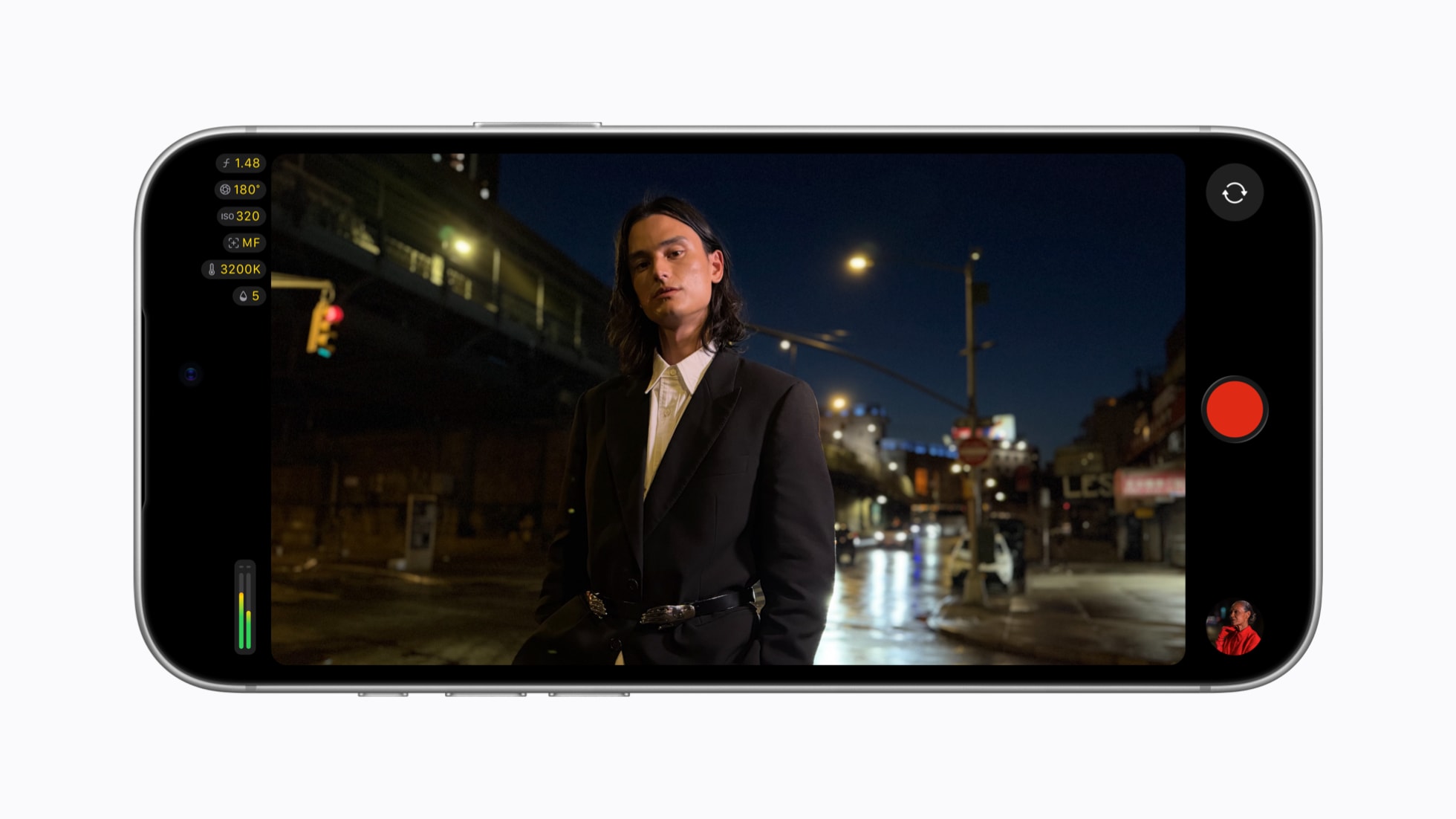
The headline change is aperture. Apple says the iPhone 18 Pro has a new Fusion Main camera with variable aperture, which it calls the most advanced camera Apple has ever made, and that this brings aperture control to iPhone for the first time. In Final Cut Camera, creators can dial in aperture settings precisely or choose between shutter priority and aperture priority modes when recording.
Why does that matter? Aperture is the size of the opening that lets light into the lens. A wider opening lets in more light and gives a shallower depth of field, with a more blurred background, while a narrower opening lets in less light and keeps more of the scene in focus. Until now, most phone cameras have used a fixed aperture and relied on software and sensor adjustments to cope with changing light. Filmmakers typically want to control exposure through three levers, aperture, shutter and sensitivity, and giving them the first one on a phone is the point of this update. Apple's post does not list the available aperture settings inside Final Cut Camera, and it does not describe how aperture behaves during zoom or in low light, so we cannot say how much freedom you will have in practice.
Shutter priority and aperture priority are semi-automatic modes familiar from traditional cameras. In shutter priority you set the shutter and the camera adjusts other values to keep exposure sensible. In aperture priority you set the aperture and the camera handles the rest. Apple says both are available to creators on iPhone 18 Pro, which suits people who want to control the look of the image without working fully manually.
Redesigned controls and monitoring aids
Apple says the redesign gives easier access to popular settings, specifically shutter angle, ISO and white balance. Shutter angle is a film-style way to express shutter speed, tied to frame rate, and many video professionals prefer it because it keeps motion blur consistent when the frame rate changes. ISO is sensitivity, and white balance fixes the color temperature so whites look neutral under different lighting.
The app also offers customizable overlays, including false color and clipping indicators for judging exposure. False color paints brightness ranges in different colors so you can see which parts of a shot are underexposed or about to blow out, and clipping indicators warn when highlights or shadows lose detail. Apple says focus peaking has been improved with sensitivity control, which highlights the sharpest edges on screen so you can confirm focus. A new tally light shows when recording is underway, which helps on a busy set where several people share monitors, and a two-finger tap now clears the viewfinder so you can see the shot without interface clutter.
Cinematic mode for regular video
Apple says the update unlocks Cinematic mode effects for regular video, including footage captured in ProRes and Apple Log. This lets creators adjust focus points and depth of field while editing in Final Cut Pro. ProRes and Apple Log are formats associated with higher-quality recording and more flexible color grading. If you already record in them and edit in Final Cut Pro, this could save reshoots caused by a missed focus pull. The announcement does not say which resolutions or frame rates are supported with this feature, or how large the files will be, so check the app before planning a shoot around it.
What iOS 27 adds
With iOS 27, Final Cut Camera adds support for professional video scopes, clean SDI out and genlock offset. Apple describes the scopes as including the RGB Parade, which displays the red, green and blue channels so you can check color balance and exposure, and the histogram. Scopes give objective feedback that does not depend on how bright or color-accurate the phone screen looks, which matters outdoors.
Clean SDI out lets creators send a clean video signal, without interface overlays, using an HDMI-to-SDI converter, and Apple frames it as enabling broadcast-quality streaming. This suggests live and multi-camera setups, where an iPhone may feed a switcher or a larger monitor. Apple does not name any converter or give cable requirements, so test your adapter chain in advance.
Genlock offset is for multi-camera work. Genlock keeps cameras synchronized, and Apple says the offset lets creators compensate for image artifacts from a recorded display when filming a screen, or for latency differences between an iPhone and other genlocked cameras. This is a niche feature, but for studios and production crews it can decide whether an iPhone can sit next to dedicated cinema cameras.
Who is this for
- Independent filmmakers and content creators who want more manual control from a phone and already use Final Cut Pro.
- Multi-camera crews and live streamers who can use SDI output and genlock offset.
- iPhone 18 Pro owners who want to use the new variable aperture while recording video.
- Casual video users will likely stay with the standard camera app, since Final Cut Camera is described as a professional tool and many of its features need accessories and planning.
What to check before relying on it
- Which iPhone you have. Aperture control is described only for iPhone 18 Pro. Apple's post does not say that other models gain aperture control, so do not expect it elsewhere.
- iOS version. Scopes, clean SDI out and genlock offset are tied to iOS 27, so update the phone as well as the app.
- Accessories. Clean SDI out needs an HDMI-to-SDI converter, which is not included.
- Editing workflow. The Cinematic effects for regular video are meant for adjustment in Final Cut Pro, so confirm that your editing setup supports the files.
- Storage and heat. ProRes and Apple Log footage can be large, and Apple does not give recording-time or thermal limits for 2.4.
- Test before a paid shoot. New software on a new phone is best tried on a rehearsal before an important job.
Weak points and open questions
Apple's update post is short and has no sample footage details, no list of supported formats for each feature and no comparison with the previous version of the app. We do not know how many aperture steps are available, whether aperture can change during a take, or how the new scopes affect performance. These questions will be answered by creators who test the app in the coming weeks.
Bottom line
Final Cut Camera 2.4 is a free update that turns the iPhone 18 Pro's variable aperture into a practical shooting control and adds pro monitoring and output features with iOS 27. It will matter most to people who already treat an iPhone as a serious camera. If you are among them, update and run a test shoot. If you are not, there is no need to change how you record just because of this release.